LLaDA-Image image editor
LLaDA-Image Editor — Instruction-Guided Edits
Treat LLaDA-Image as an online image editor: upload a reference, write the instruction, and update style or content without a separate editing backbone.
This site is an independent third-party browser workspace for LLaDA-Image. It is not affiliated with inclusionAI. Official code and weights remain on GitHub, Hugging Face, and ModelScope.
Edit an existing image with instructions
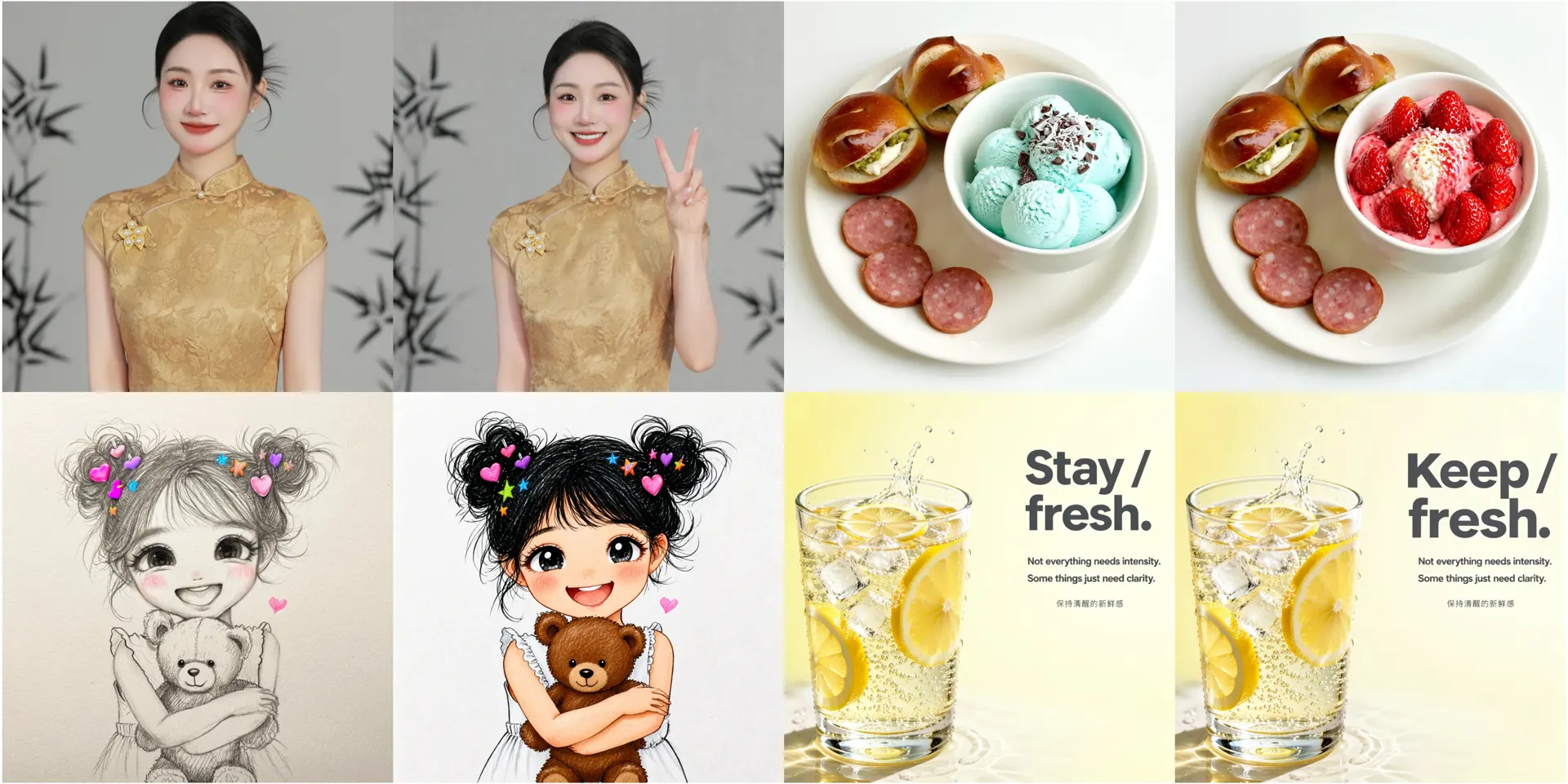
Upload a photo or previous generation, then describe what should change. LLaDA-Image keeps the subject recognizable while you update background, style, clothing, or on-image text — without a separate editing model.
Edit workflow on this site
Use the workspace upload path when you already have a source image.
Upload a reference
Start from a photo, product shot, or previous generation that should stay recognizable.
Describe the change
Write a concrete instruction: change background, restyle clothing, fix text, or adjust lighting — keep what must stay.
Compare Base and Turbo
Turbo helps you explore edit directions quickly; Base is better when fidelity matters more than latency.
When this editor path fits
Use this path when regenerating from scratch would break identity, product details, or layout. Start from a clear reference, write one primary change, then compare Base for fidelity and Turbo for faster trials.
- One model family for generate and edit intents.
- Useful for posters and bilingual layout tweaks after a first pass.
- Independent workspace with clear non-affiliation disclaimer.
Related pages
Editor FAQ
Is LLaDA-Image only a generator?
No. The open family covers text-to-image and instruction-guided editing. This editor page is for the latter intent.
What size constraints matter?
Follow public Diffusers guidance: editing paths typically expect dimensions divisible by 32. The workspace helps you stay in practical ranges.
Can Turbo edit as well?
Yes. Turbo keeps gen + edit intent with fewer sampling steps for faster loops.
Is this an official editor product from inclusionAI?
No. Official weights and code are on GitHub/Hugging Face. This site only provides an independent online UI.
Edit a reference now
Upload an image in the workspace and describe the change. Keep GitHub open for official sampling tips.